PEER365 FEATURES / Command Center
See your website’s search work, activity and priorities in one place.
The Command Center brings the platform’s SEO, GEO and AEO information together so you can understand what needs attention, what has changed and what to review next. Combine a clear overview with the ability to investigate the pages and tasks behind it.
Call us daily: 6:00 AM–11:00 PM Central Time

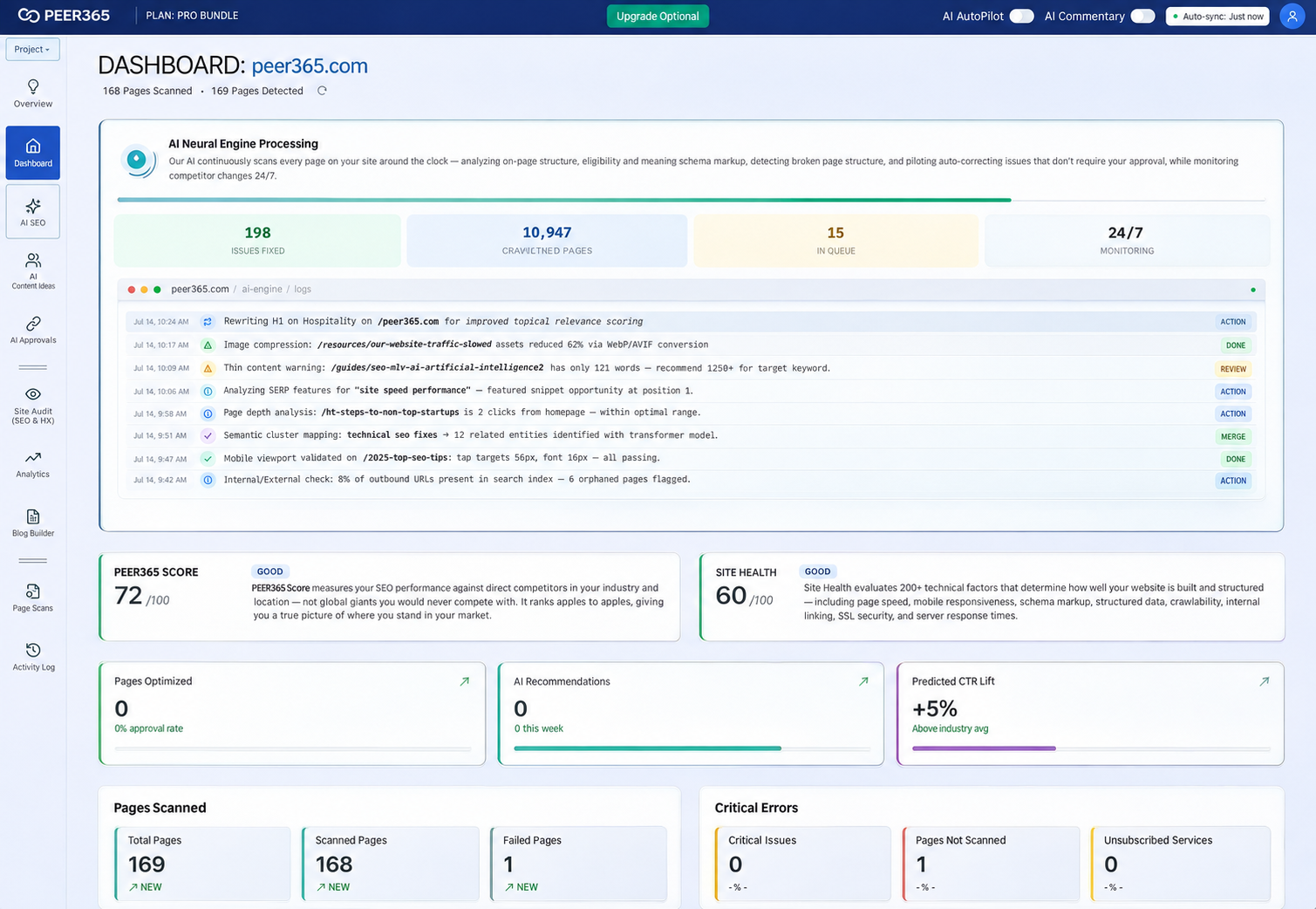
A clear explanation
What is the Command Center?
It is the central workspace for reviewing connected website health, visibility indicators and optimization activity. Use the dashboard as a starting point for decisions, then inspect the individual findings and publishing settings before acting.
Command Center / 01
Three search disciplines. One clearer view.
Use each discipline to ask a different question about the same website, rather than expecting one score to explain every customer interaction.
SEO · Search foundations
Make important service and product pages easy to find, navigate and understand. Clear titles, helpful copy, relevant links and accessible technical foundations support the customer’s journey from a search result to your website.
GEO · AI search visibility
Explain your business and expertise clearly enough to serve as useful source material for AI-generated answers. Focus on accurate entity details, supporting evidence and resources that answer questions in context.
AEO · Direct answers
Give customers concise answers followed by useful detail. Well-organized questions, definitions and appropriate structured data help describe the content; search platforms independently choose their answer sources.
Command Center / 02
Understand what the platform is doing
Activity reporting helps separate a recommendation from a completed update. Look for the page affected, the action taken and what still needs approval.
Live activity feed
Review scanning, analysis and supported optimization activity as recorded in the platform. Keep an eye on exceptions and tasks that need attention.
Score and site health
Use the platform’s proprietary score to identify areas for investigation. Compare similar measurements over time rather than treating the number as a search-engine grade.
Completed fixes
See recorded work and review the affected URLs. Publishing an update is a useful milestone, but it does not mean the URL has already been reindexed.
Forecasts and visibility indicators
Use available click-through or visibility estimates as planning inputs. Compare forecasts with observed results when enough data becomes available.
Ongoing monitoring
Watch for changes and revisit priorities as the website grows. Monitoring does not replace checking important business details.
Command Center / 03
A ranking report alone does not explain the whole picture
A visitor can encounter your business through a search listing, an answer box or an AI response. You need to know which channel a measurement represents before deciding what to change.
Conventional visibility
Review impressions, clicks and page positions where connected search data is available.
AI discovery
Inspect mentions and citations in tracked AI responses. A missing mention may prompt a closer look at the topic and the resources available.
Answer readiness
Review whether important questions have direct answers and whether the page structure describes them clearly.
Command Center / 04
Measure work completed and outcomes observed
Keep implementation progress separate from customer outcomes. Both matter, but they tell different stories.
Implementation
Record pages updated, tasks completed and approvals outstanding.
Search response
Review available index status, impressions, clicks and citations over time.
Business response
Where tracking is configured, connect website activity with calls and inquiries. Check lead quality with your team.
Command Center / 05
Start with a baseline. Build a repeatable review routine.
A consistent review process helps you interpret change without reacting to every short-term movement.
01 · Connect and scan
Confirm the correct website and required access. Review technical findings and the baseline information available.
02 · Understand the priorities
Inspect the pages and issues behind the summary. Agree which services and customer journeys should receive attention first.
03 · Apply and review
Use approval or automated execution for supported actions. Return to the activity log and compare later performance with the starting point.
Command Center / 06
Choose a workflow that turns information into action
Standalone reports can be valuable. The difference in a connected workflow is how the information reaches implementation, review and follow-up.
| Workflow stage | Separate manual workflow | Connected platform workflow |
|---|---|---|
| Research | Collect findings across reports and spreadsheets. | Review connected findings and choose a relevant next action. |
| Content | Write or brief each update separately. | Prepare supported articles or page rewrites within the toolkit. |
| Publishing | Format and deploy changes through a separate process. | Use the configured website connection and approval mode. |
| Structured data | Review and implement suitable markup manually. | Use supported schema workflows and check plugin compatibility. |
| Monitoring | Revisit queries and compare previous notes. | Review available tracked keywords, citations and activity. |
| Business judgment | Your team verifies priorities, claims and customer needs. | Your team still owns strategy, accuracy and publishing controls. |
A comparison of work processes, not a claim that another vendor lacks a feature. Review current capabilities and your website connection before choosing tools.
Inside the platform
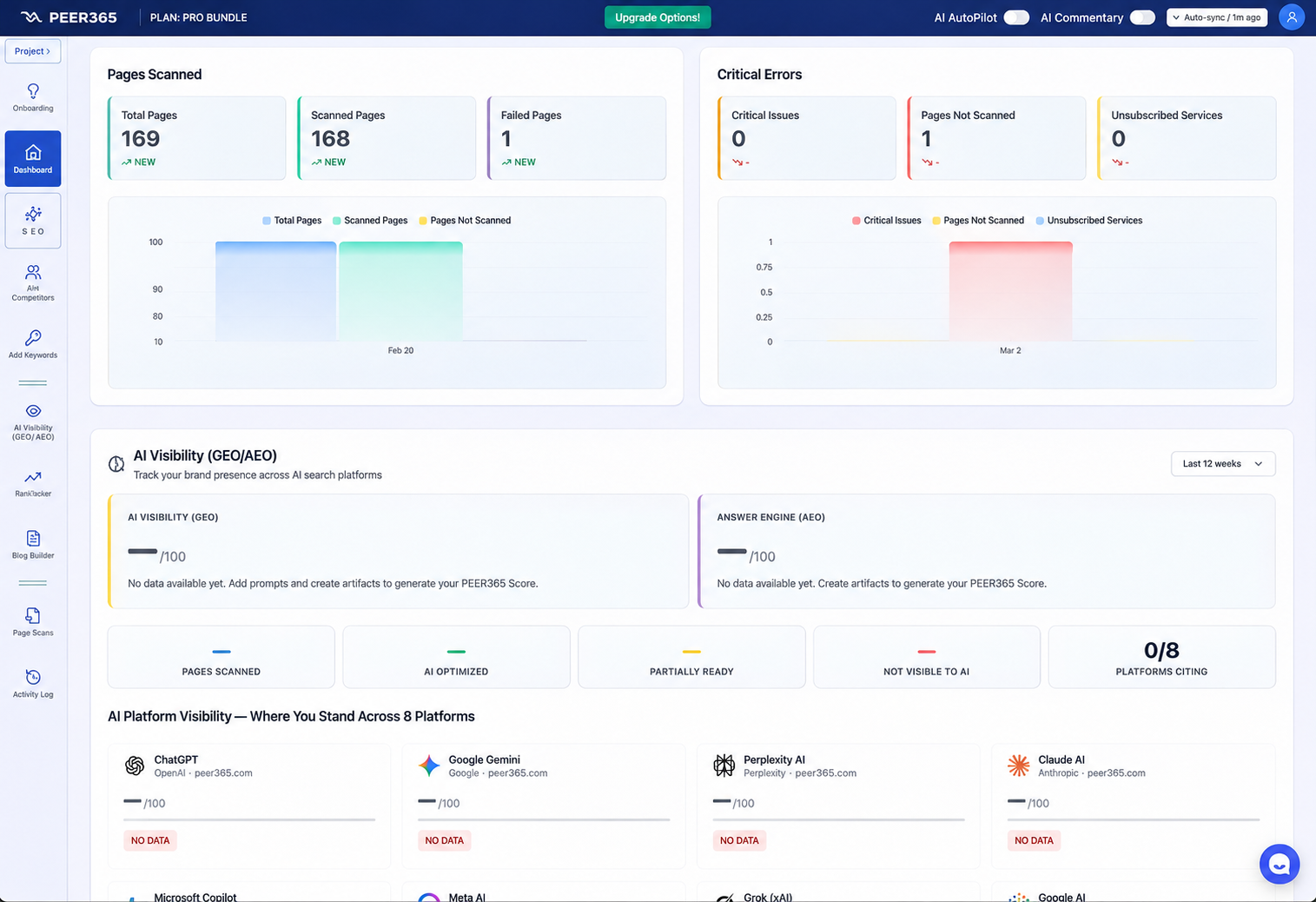
Look beyond a summary score.
Use the available breakdowns to inspect where the activity and visibility changes occurred, then connect those findings with a specific page or next action.
Questions before you begin
Command Center: frequently asked questions
What is the platform score measuring?
It is the platform’s own diagnostic indicator. Use its breakdown to understand findings; it is not a Google ranking factor or a guarantee of traffic.
What does the AI engine do?
It analyzes connected website information and prepares supported optimization actions. The dashboard helps you review activity and configure how supported changes are deployed.
Does the dashboard replace a marketing strategy?
No. Your services, target customers and conversion goals should determine the priorities. PEER365 can help translate the reports into a practical plan.
Which AI platforms can I monitor?
The current toolkit describes nine supported AI experiences. Check your dashboard for the account’s active channels, prompts and reporting scope.
Can I review changes before publication?
Yes, use manual approval where supported. Confirm the publishing permissions and workflow before enabling automatic changes.
How much does access cost?
Review the PEER365 pricing page for current packages and allowances. The features form part of the connected platform.
How quickly should I expect results?
Recorded technical work may appear before search outcomes change. Indexing, rankings and AI citations depend on independent platforms and your starting point.
What installation is required?
Reporting and site analysis differ from live deployment. Publishing supported changes requires the appropriate website connection and permissions.
How do GEO and AEO differ?
GEO concerns visibility in generated answers. AEO focuses on direct, well-structured responses to questions. Both benefit from accurate content and clear organization.
Platform scores and forecasts are diagnostic indicators, not Google metrics or promised outcomes. Available actions depend on your plan, website connection and permissions. Search engines and AI platforms decide when to index content, which sources to show and where pages rank.
Experience and a practical plan
A connected platform. A direct conversation with PEER365.
PEER365 has served businesses since 2001. As a PEER365 Search Platform, we connect the platform’s capabilities with a practical conversation about your website, customers and priorities. Work with a Greater Houston marketing specialist who can explain the next steps in plain language.
Your next customer could be searching now
Give your website a clearer path from discovery to inquiry.
Talk with PEER365 about the services, markets and customer questions that matter most. Start with a practical review, then choose the platform coverage that fits your website.
View PEER365 pricing and plan allowances →Start with a free website analysis.
Discuss your current visibility, customer experience and the next improvements worth making.
Request My Free Analysis →Call (832) 713-6365Monday–Sunday, 6 AM–11 PM Central Time