PEER365 FEATURES / AI Blog Builder
Move from a useful customer question to a complete, structured article.
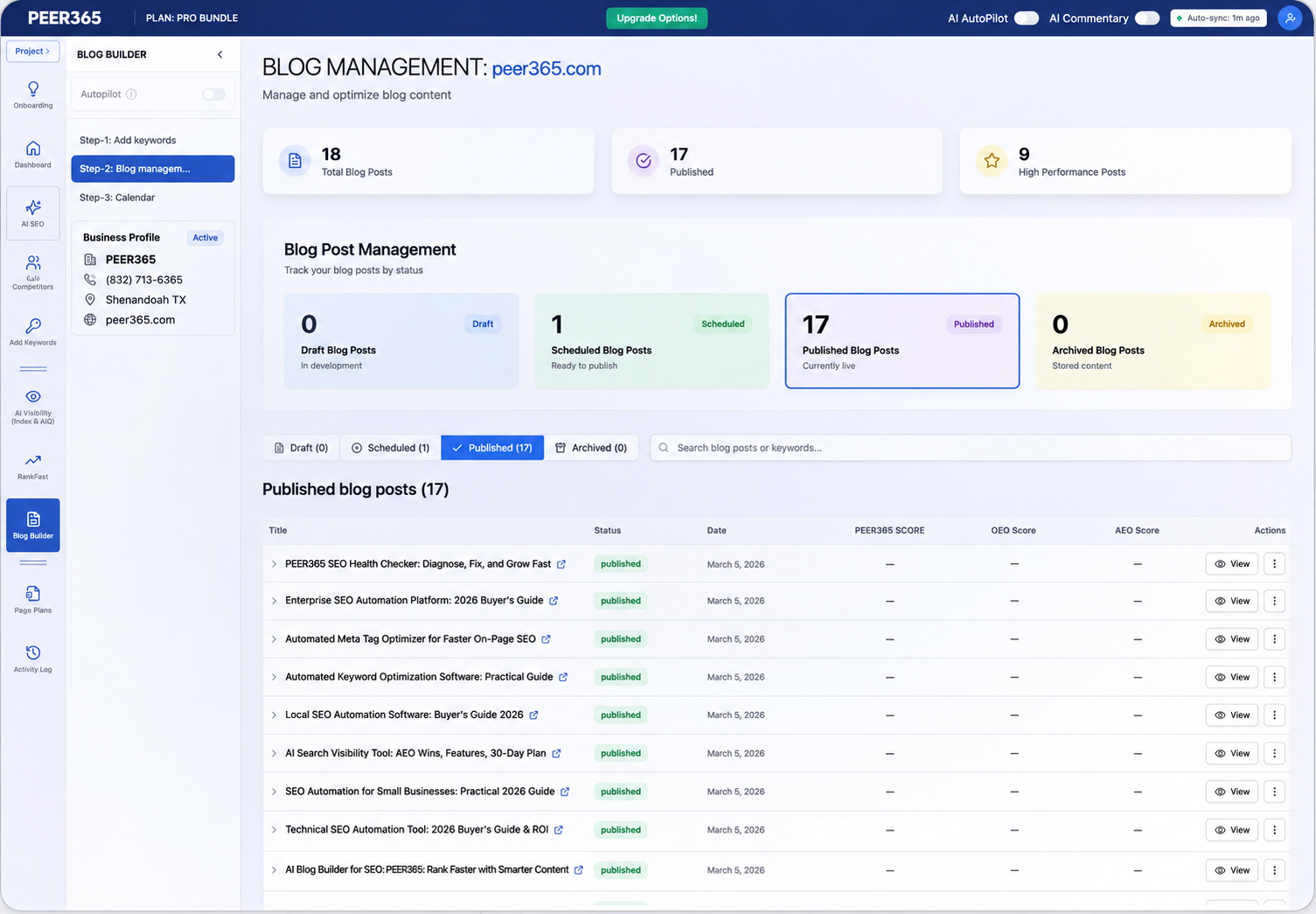
AI Blog Builder combines article creation with page preparation, review and publishing. Develop relevant content, organize it clearly and connect it to the rest of your website instead of managing disconnected drafts.
Call us daily: 6:00 AM–11:00 PM Central Time

A clear explanation
What does AI Blog Builder create?
It produces full articles, generally in the 1,500–3,000-word range, with supporting on-page elements and a connected publishing workflow. Choose the length and level of detail that suit the topic; useful coverage matters more than reaching a word count.
AI Blog Builder / 01
Prepare one resource for different ways people search
The same article should be readable to people and clearly organized for the systems that interpret it.
SEO · Relevant and accessible
Use a descriptive title, logical headings, useful internal links and accurate metadata.
GEO · Clear and supportable
Define the business or subject clearly and support important claims. Make information understandable outside a single sentence’s immediate context.
AEO · Direct and helpful
Answer the main question promptly, then explain the detail. Add relevant FAQs and appropriate structured data.
AI Blog Builder / 02
Know what the content scores do—and do not—tell you
Pre-publication scores can identify missing elements. They are platform diagnostics, not independent proof of accuracy, originality or a future ranking.
SEO review
Check structure, metadata, links and relevance.
GEO review
Check entity clarity and useful supporting information.
AEO review
Check whether the article answers real questions clearly.
AI Blog Builder / 03
From topic selection to a live article
Use the publishing process as a quality checkpoint rather than a race to produce more pages.
01 · Choose a relevant keyword
Start with a service, product or customer question. Use Keyword Intelligence to assess existing coverage and avoid unnecessary duplication.
02 · Build the article
Generate a complete resource with a logical structure, supporting detail and relevant internal connections.
03 · Review quality and scores
Verify facts, examples, sources and business claims. Check the platform diagnostics, then edit for readability and brand voice.
04 · Publish or schedule
Use the supported website connection to deploy approved content, or keep it as a draft until ready. Submit eligible URLs for indexing.
AI Blog Builder / 04
The supporting features behind a complete publishing workflow
A useful article is more than a block of text. Keep the organization and delivery steps connected.
Calendar and scheduling
Plan topics in advance and manage draft, scheduled and published content from a shared workflow.
Keyword gap to article
Turn an appropriate informational gap into a focused resource. Improve an existing page when that is the better answer.
Internal linking
Connect the article to relevant service pages and supporting resources so readers can continue naturally.
Performance review
Review available traffic, query and citation information after publication. Use findings to improve useful content.
Schema and metadata
Prepare supported structured data and page-level fields suited to the content. Avoid conflicting markup from other plugins.
AI-search-ready explanations
Use clear definitions, appropriate sourcing and specific business information. Citation selection remains independent.
AI Blog Builder / 05
Compare a complete publishing workflow with text generation alone
Writing assistance is valuable, but your team still needs to handle review, formatting, links, metadata and delivery. A connected workflow brings those stages closer together.
| Workflow stage | Separate manual workflow | Connected platform workflow |
|---|---|---|
| Research | Collect findings across reports and spreadsheets. | Review connected findings and choose a relevant next action. |
| Content | Write or brief each update separately. | Prepare supported articles or page rewrites within the toolkit. |
| Publishing | Format and deploy changes through a separate process. | Use the configured website connection and approval mode. |
| Structured data | Review and implement suitable markup manually. | Use supported schema workflows and check plugin compatibility. |
| Monitoring | Revisit queries and compare previous notes. | Review available tracked keywords, citations and activity. |
| Business judgment | Your team verifies priorities, claims and customer needs. | Your team still owns strategy, accuracy and publishing controls. |
A comparison of work processes, not a claim that another vendor lacks a feature. Review current capabilities and your website connection before choosing tools.
Questions before you begin
AI Blog Builder: frequently asked questions
How long are the articles?
The supplier describes a typical range of 1,500–3,000 words. Select a suitable target and remove repetition; length alone does not make a resource useful.
Can I schedule content?
Use supported calendar and scheduling options to prepare content in advance. Confirm the website connection and publishing settings.
Do I need a website connection?
Direct publication requires the appropriate connection and permissions. Review the available export or manual publishing options if your workflow differs.
Does the article include SEO elements?
The workflow supports headings, internal links, metadata and appropriate schema. Review the saved page and compatibility with existing site plugins.
How does it support GEO?
It helps organize clear explanations and entity information. You must still verify claims, supporting evidence and business facts.
How does it support AEO?
Use direct answers, definitions and relevant FAQs. Search systems independently choose whether to display a snippet or another answer feature.
How is this different from an AI writing tool?
It connects article generation with page preparation, review, scheduling and supported publication rather than ending at draft text.
Should someone review each post?
Review is especially valuable for business claims, prices and specialist subjects. Choose an approval mode suited to the content.
What is included in my package?
See PEER365 pricing for the current monthly article allowance, website capacity and other platform tools.
Platform scores and forecasts are diagnostic indicators, not Google metrics or promised outcomes. Available actions depend on your plan, website connection and permissions. Search engines and AI platforms decide when to index content, which sources to show and where pages rank.
Experience and a practical plan
A connected platform. A direct conversation with PEER365.
PEER365 has served businesses since 2001. As a PEER365 Search Platform, we connect the platform’s capabilities with a practical conversation about your website, customers and priorities. Work with a Greater Houston marketing specialist who can explain the next steps in plain language.
Your next customer could be searching now
Give your website a clearer path from discovery to inquiry.
Talk with PEER365 about the services, markets and customer questions that matter most. Start with a practical review, then choose the platform coverage that fits your website.
View PEER365 pricing and plan allowances →Start with a free website analysis.
Discuss your current visibility, customer experience and the next improvements worth making.
Request My Free Analysis →Call (832) 713-6365Monday–Sunday, 6 AM–11 PM Central Time